I Put a Consumer-Grade Hip Assist Exoskeleton on My Dad and Took Him Up a Mountain: The Two Steps After Taking It Off Were More Convincing Than Any Spec
This isn't a lab-bench data review—it's a "family field test": I strapped a consumer-grade hip assist exoskeleton onto my dad and accompanied him through a complete mountain hike. I'll put the conclusion right up front—it didn't turn my dad into Superman, but it made him a "person who can climb mountains" again.

1. Before Setting Off: A Dad Who "Can't Walk Far," and a "Physical Cheat Code"
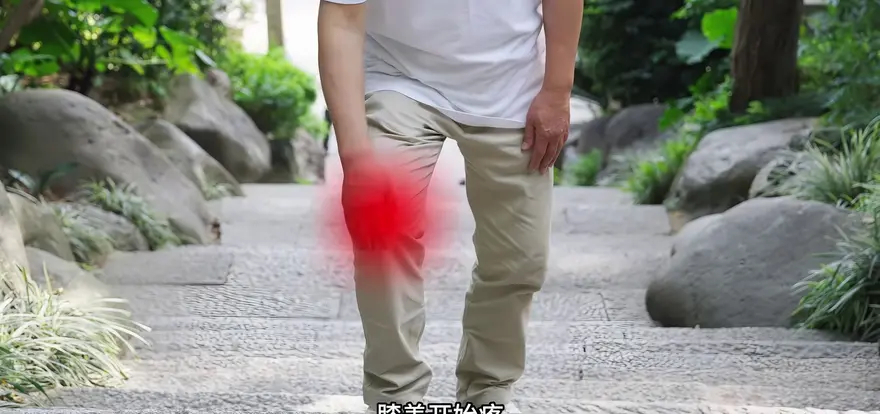
Every time we travel together, my dad gets incredibly excited and packs more eagerly than anyone else. The result? Before long, his legs give out, his knees start to ache, and he has to find a spot to sit down and wait for us. We can't have every trip amount to just one stretch of scenery, can we?
"To help him climb and walk farther today, I decided to equip him with a physical cheat code." — as mentioned in the video
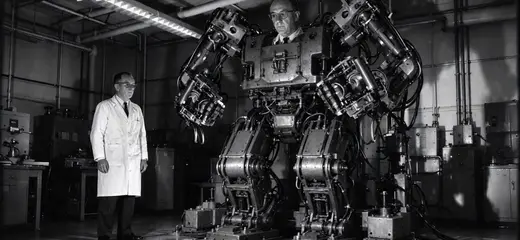
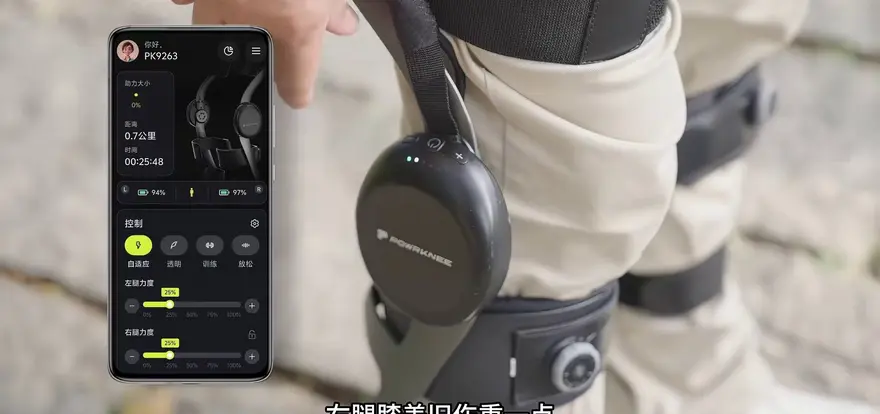
The star of this episode is a consumer-grade hip assist exoskeleton, a branch of the lower-limb exoskeleton family. The principle, frankly, isn't complicated: brushless motors sit inside the drive units on both sides of the waist and hips, while components like IMUs and pressure sensors detect your gait phase, delivering joint torque at the exact moment you lift your leg or push off the ground—giving your hip joints a helping hand. Once the hips are doing less work, the strain across the entire leg—especially the pressure the knees have to bear—drops noticeably in terms of what you actually feel.
Two things need to be cleared up first. First, don't confuse this with the rehabilitation exoskeletons you see in hospitals: those are medical-grade devices used for gait rehabilitation training—an entirely different species from this consumer-grade product you wear out on a hike. Second, this space has genuinely heated up over the past couple of years—new brands like Hypershell and Dnsys lead with outdoor trekking assist, Chengtian, Kenqing, and Aosha got their start in rehabilitation and industrial settings, and outdoor brands like Toread are crossing over to test the waters. "Wearable assist" is going from trade-show concept to shelf-ready product.


But no matter how impressive the spec sheet looks, nothing beats having a dad with bad knees actually climb a mountain. That's the value of this episode.
2. Wearing & Portability: Adjust the Straps Once, Then Just "Clip On and Go"
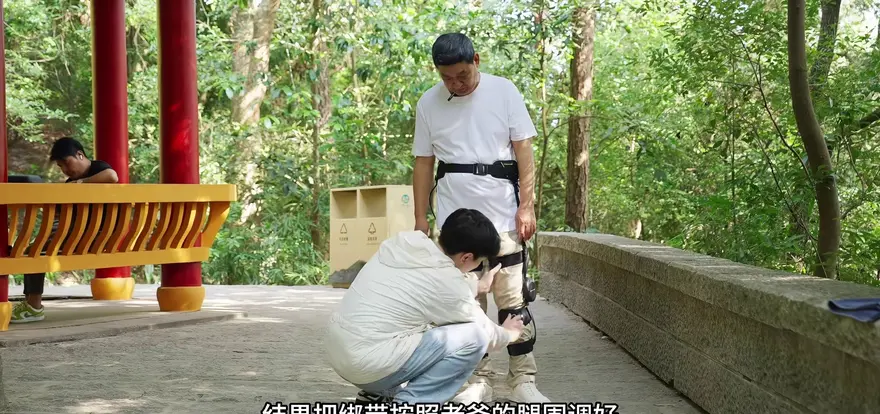
When I first unboxed it, I assumed I'd have to spend ages figuring out how to put it on. In practice, once the straps were adjusted to fit my dad's leg circumference, putting it on and taking it off came down to simply clipping the buckles—no readjusting needed each time. For elderly users, that alone is a real peace-of-mind win.
Portability also clears the bar: it folds down compactly, slips into a bag without hogging space, and is easy to bring along when heading out. For the typical workflow of "drive to the foot of the trail, then suit up," the folded size—much like the device's own weight—directly determines whether you'll actually take it with you. After all, products in this category generally rely on aluminum alloy or even carbon fiber structures to keep weight in check.
Weight was the most common complaint I came across while doing my research.
"While doing my research, I saw people saying the product is a bit heavy, but it actually felt fine on my dad." — mentioned in the video; no specific weight figure given
It did feel fine on my dad, likely because his height and weight happen to be a good match. When I asked whether it felt heavy, the old man just waved his hand:
"Piece of cake. Not heavy, not tiring—and I look kind of cool in it." — my dad's exact words, as mentioned in the video

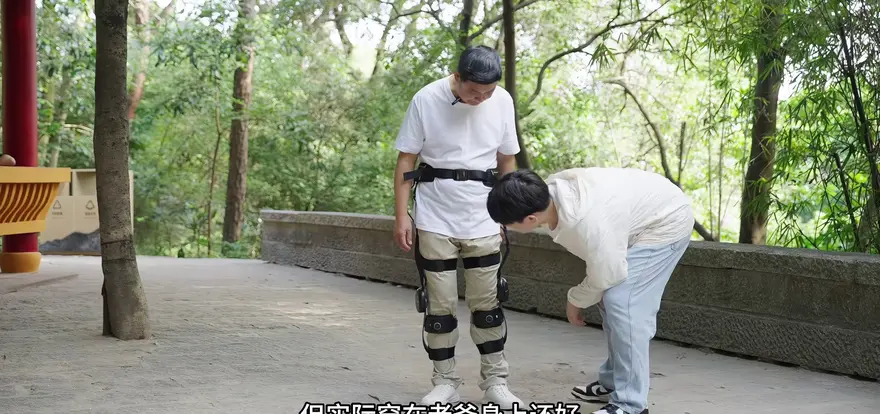
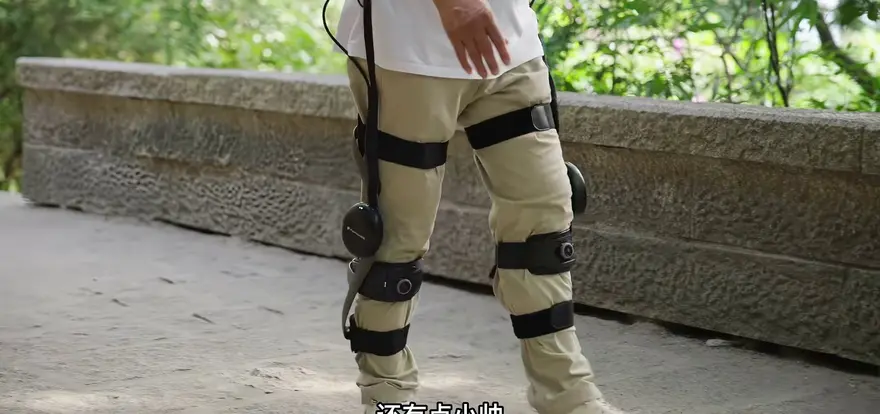
That said, a question mark is warranted here: the video never provides a specific figure for the device's own weight, and the "it's fine" verdict hinges on the premise of "a well-matched height and weight." For older users with smaller frames and less muscle mass, the same few kilograms of device weight could be a completely different experience. This variable will come up again in the recap later on.
3. The Feel of the First Step: "Like Someone Pushing Me Forward from Behind"
Is it really that effortless? Don't just judge by looks—take it for a walk and you'll know.
After just two steps, my dad could already feel the difference:
"It feels like someone is pushing me forward from behind." — Dad's exact words, as mentioned in the video

After walking for a while, his description got more precise: "I think I'm getting used to it—it's like it's learning my walking style." The moment you're about to take a step, the assist is already there—no lag whatsoever; and it's not that stiff jab against your knee either. The longer you walk, the smoother it gets, as if it's gradually figuring out your walking habits.

This description of the physical sensation hits precisely on the technical watershed for consumer-grade assistive exoskeletons: assist timing. If the sensor recognizes the gait phase one beat too early, the force arrives abruptly—that's the "stiff jab against you." One beat too late, and the leg has already swung forward before the force arrives, rendering it useless. Only when the timing is spot-on and the torque curve is smooth enough do you get that "someone pushing from behind" sensation, rather than the jarring, mechanical feel of "a machine dragging me along." No matter how impressive the peak torque specs look, if the timing is off, the experience is night and day.


4. The Real Proving Ground Is Stairs: From "Resting Every Dozen Steps" to "Climbing to the Top in One Go"
Flat ground is just the warm-up — stairs are where the exoskeleton faces its real exam. Climbing stairs is one of the most demanding everyday movements for the lower limbs: the load on the knee joint at the instant of stepping up far exceeds that of walking on level ground. For an elderly parent with an old knee injury, stairs are the ultimate gatekeeper.
As mentioned in the video: Climbing stairs like these used to mean "stopping for a rest every dozen steps or so," and I had to hold him steady from behind; today, he powered all the way up in one go while I chased behind him, gasping for air.

As for how it actually feels, here's Dad in his own words:
"Stairs I once had to grit my teeth to climb now feel just like walking on flat ground — there's barely any strain on my legs at all." — as mentioned in the video

It's worth noting that the hip assist module doesn't directly drive the knee joint — what it assists is the hip joint. But walking and stepping up are chain-reaction efforts across the entire leg: once the hip gets that extra "pull," the explosive force the thighs need to generate and the impact the knees have to absorb both drop accordingly. That's exactly why the assist sits at the hip — yet it's the knees that get saved.
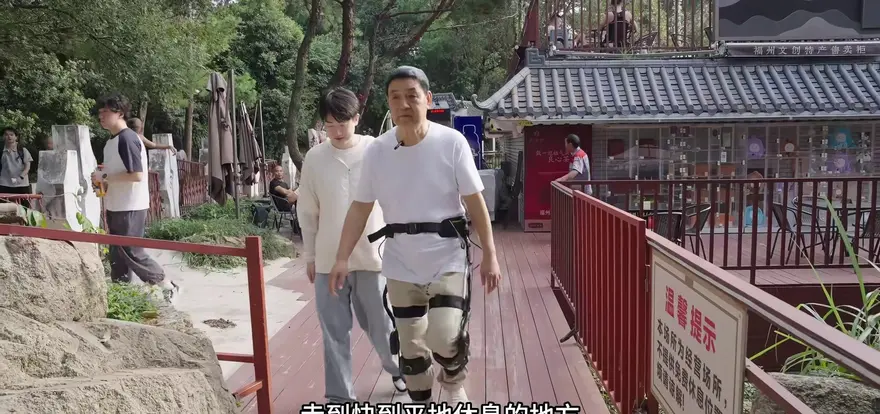

5. The Most Convincing Experiment in the Entire Video: The Two Steps After Taking It Off
As we approached a flat spot to rest, I suddenly wanted to run a test: take the exoskeleton off and have Dad walk two more steps to see how it felt. Honestly, I was dying to try it myself too—I wanted to know what "striding like the wind" actually felt like.
The result turned out even more dramatic than expected.

Barely two steps after taking it off, he stopped, rubbing his knees, and said:
"My legs suddenly felt so heavy, like they were filled with lead." — Dad's exact words after removing the exoskeleton, as mentioned in the video
With it on, he was striding along powerfully; two steps after taking it off, he could barely go on. This contrast makes one thing clear: the climb just now wasn't him suddenly turning into Superman—the exoskeleton was genuinely taking the pressure off his knees.

Personally, I think this is the most valuable segment of the entire video. The biggest pitfall in exoskeleton reviews is the vague impression of "it's nice to wear, but I could probably manage without it"—that means the assist is so weak it's practically negligible. But the A/B contrast of "big confident strides with it on, legs like lead two steps after taking it off" rules out both psychological suggestion and the placebo effect: the assist is real, and the moment it comes off, your body is the most honest witness.
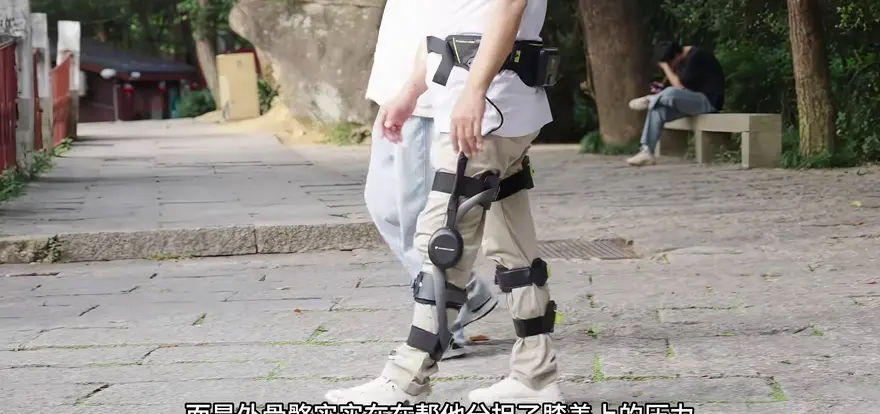

6. My Turn to Wear It: Three Steps to Relearn My Gait, Then "Smooth as Chocolate"
The exoskeleton can't just sit idle once it's off. The moment it was my turn to put it on, another interesting detail emerged: look at me now—a completely different person from the one hiking up that mountain just moments ago. But for the first three or four steps, it needed to relearn my gait.

The exoskeleton had just finished adapting to my dad's gait; when it was my turn, it spent the first three or four steps relearning mine. After that—whether going up and down stairs or walking on flat ground—it was smooth as chocolate.
"The thrill of human-machine symbiosis—you have to try it firsthand to know." — As mentioned in the video

Those few steps of "getting reacquainted" reveal how the algorithm actually works: gait recognition is calibrated on a per-person basis. It remembers your step cadence, leg-swing rhythm, and force patterns, then aligns its own joint torque output to your rhythm. For family users, this means one device can realistically be shared by the whole household—but every time the wearer changes, there's a brief few-step "break-in period." That's not a flaw—quite the opposite: it's proof that the device is genuinely learning you, rather than playing back a hardcoded assist curve.


7. Three Easily Overlooked Details: Sit-to-Stand Assist, Independent Left/Right Adjustment, and Three Modes
Detail 1: Cushioned sitting, supported standing.
While Dad was taking a break at a rest platform, we discovered that this exoskeleton can also assist with sitting down and standing up: tap the leg rods twice, and with a "beep," you get cushioning as you sit and support as you stand. In the past, getting up from a rock meant he had to push off his knees with his hands and strain his legs to rise, and every time I had to watch him closely and steady him—I was genuinely afraid he'd lose his balance. Today, wearing the exoskeleton, he simply stood right up, with real strength holding his legs up—that alone was a huge help.
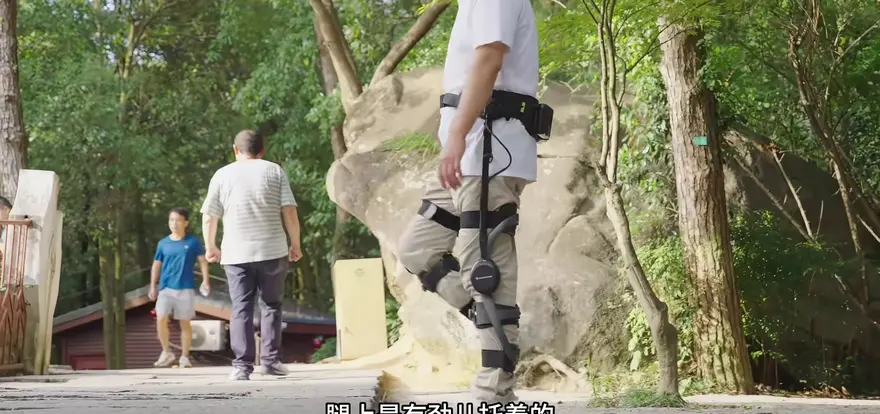
The value of this feature is easy to underestimate. "Sit-to-stand" is a key bottleneck movement for lower-limb function in older adults—it's exactly what the "30-second sit-to-stand test," a staple of geriatric medicine, is designed to measure. For older adults, being able to stand up without pushing off with their hands or leaning on someone else means dignity and a sense of security.
Detail 2: The assist level can be adjusted separately for each leg.
Dad's right knee is in a bit worse shape, so before heading out, we turned the assist up one notch on the right side and left the left side at normal. Whichever leg feels off, you adjust just that one—a genuinely thoughtful design.
Mentioned in the video: the right knee is "in a bit worse shape," and before heading out, the right-side assist was "turned up one notch."

They say old age starts in the legs—and often, in one leg before the other. Independent left/right adjustment amounts to acknowledging a fact most products pretend not to see: an older person's two legs are not in the same condition.
Detail 3: Walking assist isn't its only mode.
Beyond everyday walking assist, there's a resistance mode for training your legs—essentially an adjustable leg trainer—and when a walk wears you out, you can switch on massage mode to unwind. Everyday walking, exercise, and relaxation: one machine is all you need.


The resistance mode is a clever piece of product thinking: an exoskeleton's motor system can already do work in both directions, so by flipping "assist" into "controlled load," it goes from outdoor gear to home training device—widening both how often it gets used and the scenarios it fits into.
8. The Descent, the Debrief, and Some Sober Reflection: It's Not There to Make You Lazy — It's There to Spare Your Knees
The descent deserves just as much documentation. In the past, my dad had to grip the handrail and inch down the stone steps, never daring to take a full stride; today his steps were noticeably lighter and looser, and he walked down like normal. In his words, that cushioning feel was the real deal — not some fake, gimmicky assist.
We finally reached the summit. In the past, my dad would have collapsed into a chair long before this point; today he could still stand there taking in the view, stroll around, snap a few photos, and never once mention being tired.
"I was so happy today — from now on, I can take on this mountain with ease." — My dad's exact words, as mentioned in the video
Used to be, after a climb like this, his knees would ache half the night once he got home; today he acted as if nothing had happened.

Having finished this hike, here's my take:
"Wearing a powered exoskeleton has never been about being lazy during your outdoor workouts — it's about hurting your knees less while you exercise." — As mentioned in the video
It makes you feel like Superman when you walk, and it's especially well-suited for elderly family members who can't walk far, struggle with stairs, or find mountain climbs exhausting. Well, there you have it — my dad was a bona fide mountain-climbing robot today.

Finally, a splash of cold water — and the stance this written version would like to add:
- Hard specs were absent the entire time. The video never named the brand or model, and it offered no concrete figures for weight, battery life, endurance (in hours), price, or joint torque — only the vague impression that "the trail guides said it's a bit heavy." If you're planning to place an order, be sure to check the product page for the device weight and endurance (in hours) — these two numbers directly determine whether "taking it out the door" is itself a burden.
- "It's fine" comes with conditions. My dad's comfort was built on a good match for his height and weight. Smaller seniors with less muscle mass should go by how an actual fitting feels.
- It's an assistive exoskeleton, not a safety device. It has no self-balancing capability, and it is not fall protection equipment — hold the handrail when you need to, and keep accompanying your elders as always.
- Don't confuse it with a rehabilitation exoskeleton. A medical-grade rehabilitation exoskeleton is a gait-training device used in hospitals — a different species entirely, and a different purchase logic, from this kind of consumer-grade trekking assist product.

Oh, and one more thing — does your family have one of those elders who insists "I'm fine" but grabs the handrail every time they go downstairs? Let's talk in the comments.
Top Community Comments
The comment section isn't large, but the quality is high — the selected comments happen to cover the most typical categories of user concern around consumer-grade exoskeletons.
"Will it dig into my legs? I'm worried about leg pain." — @BaoGaoZ-Jia (7 likes)
Our take: This is the comment that hits closest to home. All interaction between an exoskeleton and the human body happens at a handful of contact points — the lumbar support pad, the thigh straps, the leg struts. Whether it pinches the legs or chafes the skin directly determines whether an elderly parent is willing to put it on a second time. The "weight is fine" verdict in the video rests on the fact that Dad's height and weight happen to be a good match, but fit is highly individual: we recommend an in-person fitting, paying close attention to the strap padding and adjustment range — especially for older users with thinner skin and less muscle mass.

"Senior-friendly — knee exoskeleton gear! With this, your knees won't ache even after walking an entire scenic area! (Two product links attached)" — @BaoZouXingHaoJian (6 likes)
Our take: This comment comes with an obvious sales pitch, but it reflects an industry reality: "senior-friendly" and "no more knee pain" have become the standard marketing script for this product category. For viewers, the key is to separate absolute promises like "your knees won't ache after a full scenic-area walk" from the kind of verifiable experience shown in the video — legs turning to lead within two steps of taking it off. The former is advertising; the latter is evidence.
"The ones that stiffly jab your knee are the worst — this one is nice and smooth, feels pretty good." — @WoKaoWoTaiShuaiLeBa (2 likes)
Our take: This comment independently corroborates, from the viewer side, the video's observation that "it doesn't stiffly jab your knee." It shows that the smoothness of the assist — how precisely the assist timing lands and how gently the torque output ramps up — is the biggest difference users can genuinely feel. The lesson for manufacturers: however impressive the peak torque spec looks on paper, bad timing makes it feel "stiff and jabby." The advice for consumers: when trying one on, what you should be sensing isn't "how strong the force is," but "how smoothly it arrives."
Editor's note: Given the common questions surrounding this category, potential buyers will most likely care about two more things. First, battery life: how many hours of endurance can it actually deliver — is that enough for a full day at a scenic area? Second, whether the sensors stay reliable at recognizing terrain in complex conditions such as rain or gravel paths. This episode answers neither question, so we recommend confirming with the manufacturer before placing an order.

Three comments that map precisely onto the three hurdles consumer-grade exoskeletons must clear on the road to the mass market: wearing comfort, marketing credibility, and the quality of the assist itself.
One-Sentence Summary
A consumer-grade hip assist exoskeleton built for home scenarios: it won't turn your elders into hiking superheroes, but it can get a dad whose "knees hurt so much he could only sit and wait" back to finishing an entire mountain hike — best suited for families with elders who can't walk far, struggle with the stairs, or find climbing exhausting, and who are willing to pay to "spare their knees." Before ordering, be sure to verify the hard specs the video didn't cover, such as the device's weight, battery life, and price.