It targets two consumer-grade scenarios:
#: hardware [Building a Dual-Hip Exoskeleton Using an Open-Source Research Platform: A Complete Practical Course from Product Definition to Software and Hardware Implementation]
Hello everyone! In this episode, we shift the camera from armchair theorizing back into the workshop and fitting room. In my past videos, I have packed quite a bit of content on algorithms, simulation, and framework-based knowledge. The comments section has been repeatedly flooded with one burning question: How exactly is a consumer-grade exoskeleton built from zero to one? How do we define the product? How do electromechanical systems work together? How is the algorithm deployed? Staying true to our "no-nonsense" philosophy, this episode uses a hip-assist assistive exoskeleton research platform as a sample. I will thoroughly break down the entire workflow, from requirement analysis, simulation verification, hardware prototyping, to final system integration. Please note that all specific parameters mentioned in this article are derived from the demonstrations and introductions showcased in the video.
I. Opening: Why consumer-grade exoskeletons Need a "Field Guide"
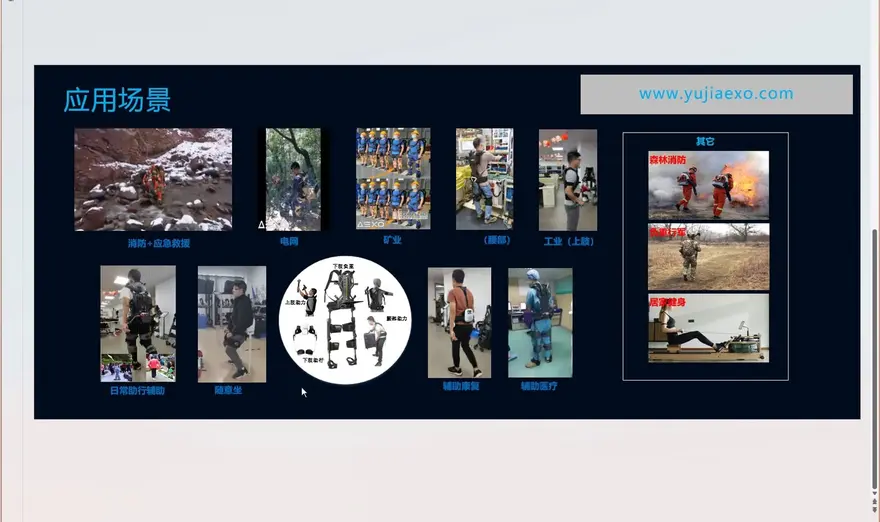
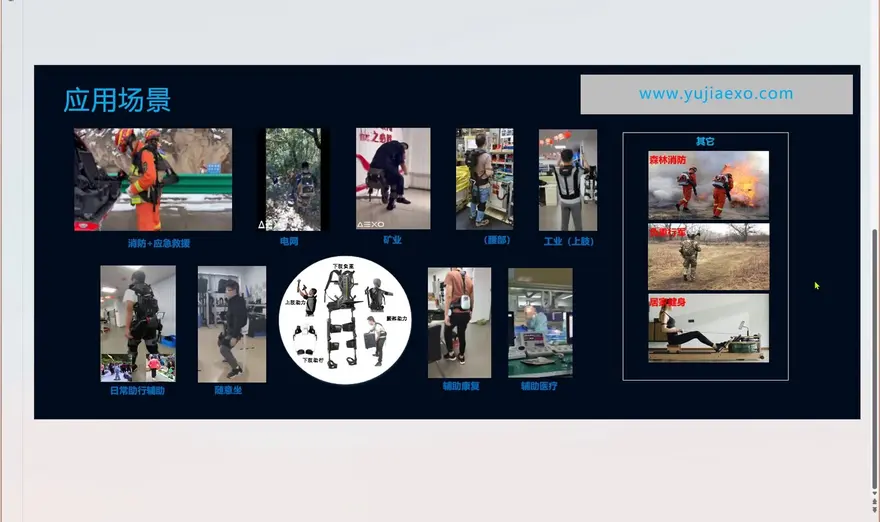
Over the past few years, medical-grade rehabilitation exoskeletons have stolen the spotlight at trade shows, but what might truly enter everyday homes is the lighter, cheaper, more focused consumer-grade exoskeleton. It aims not for clinical gait training, but for three concrete things: carrying heavy loads, assisting seniors with walking, and saving effort and money on outdoor hikes/trekking.
The creator's methodology in this video, in one line: toss out the jargon, and walk through product definition, design and development, and field validation end to end from a practical, "field-tested" perspective.
Behind this lies a real gap in the industry: students in academia studying gait and dynamics may publish brilliant papers but have rarely touched a real servo motor; hardware engineers can tune a brushless motor, integrate an IMU, and build a system—but may lack judgment on "who this product is actually for." This lesson fills in that missing middle piece—using a dual-wide-joint assistive exoskeleton as a prototype, it goes through a complete software and hardware development flow.
II. Sample Product: A Dual-Hip Joint Exoskeleton for Load Carrying and Walking Assist
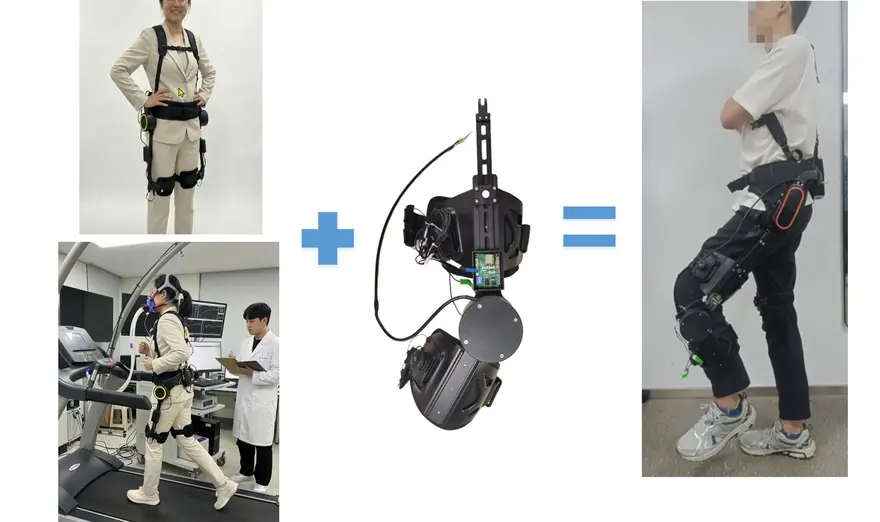
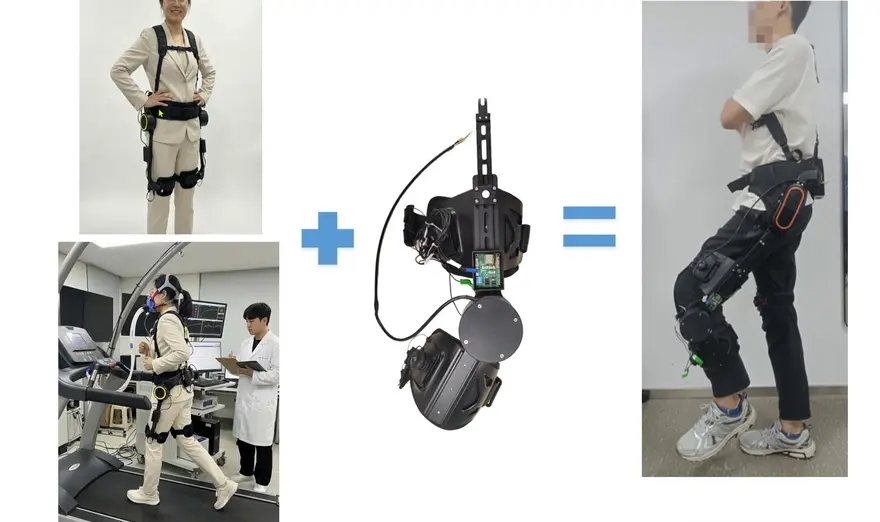
The product used as the example in the video is a typical lower-limb exoskeleton, with the core being hip assist modules at both hip joints. It does not wrap the entire leg; instead, it focuses on the most demanding hip area—when a person carries a load, climbs stairs, or stands up, the greatest joint torque demand is precisely at the hip.
It targets two consumer-grade scenarios:
- Load-carrying assistance scenario: carry heavy loads on the body, and rely on the exoskeleton to "lift" away the pressure that would otherwise sit on the lumbar spine. This is essentially the logic of lumbar / back assist, working together with hip assist.
- walking assist for older adults / assistance for lower-limb motor dysfunction: for hemiplegic patients and older adults, it provides walking assist rather than replacing walking.
Key positioning: It does not replace your walking; instead, it "gives you a push during the 0.5 seconds when you need to exert force." In product terms, this is Assistive rather than a Setup-style replacement.
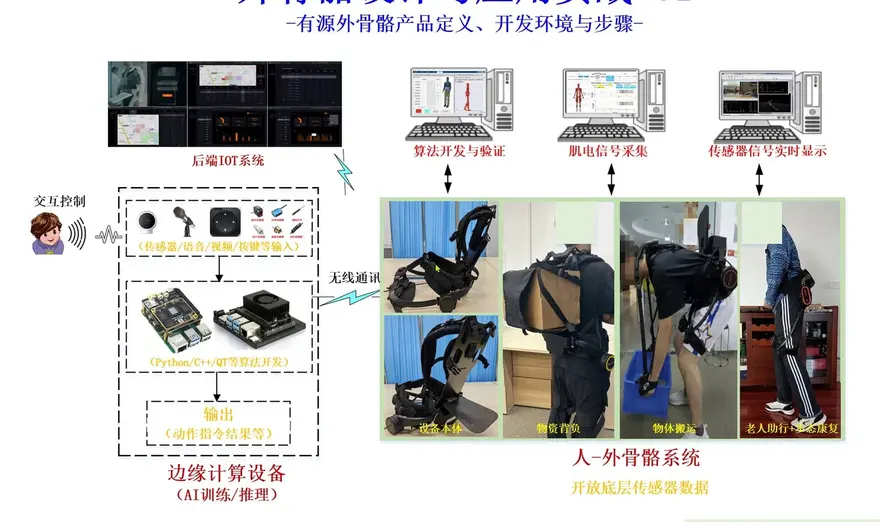
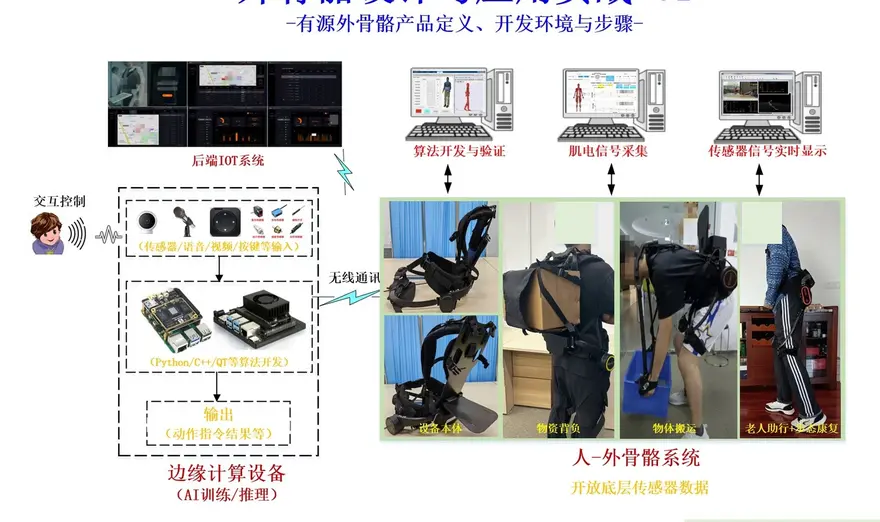
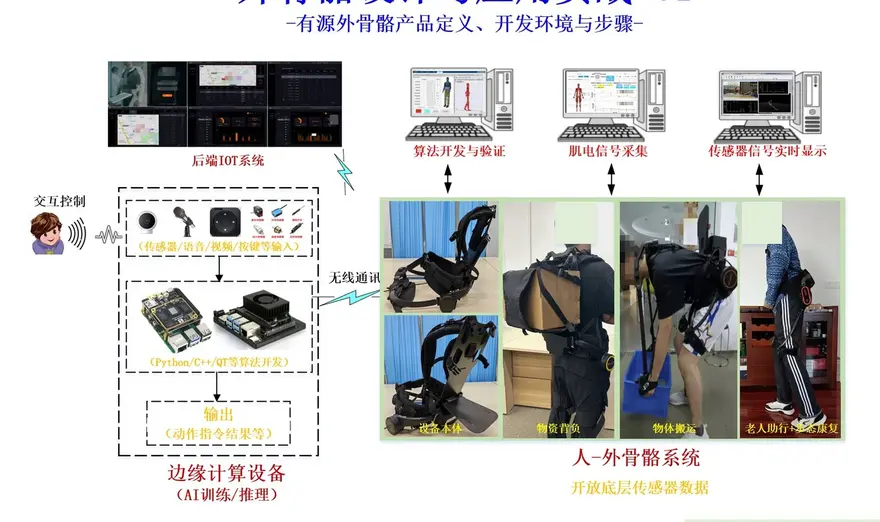
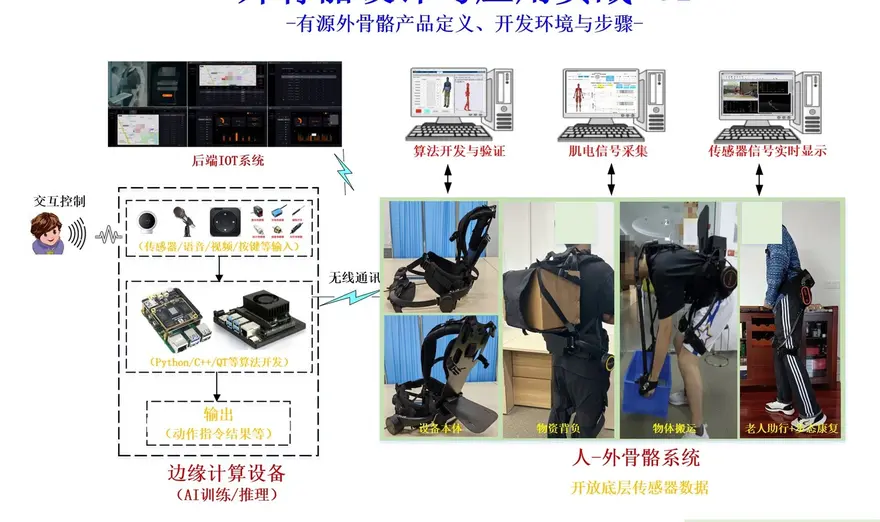
III. System Architecture: A Peripheral Tech Tree Centered on the Exoskeleton
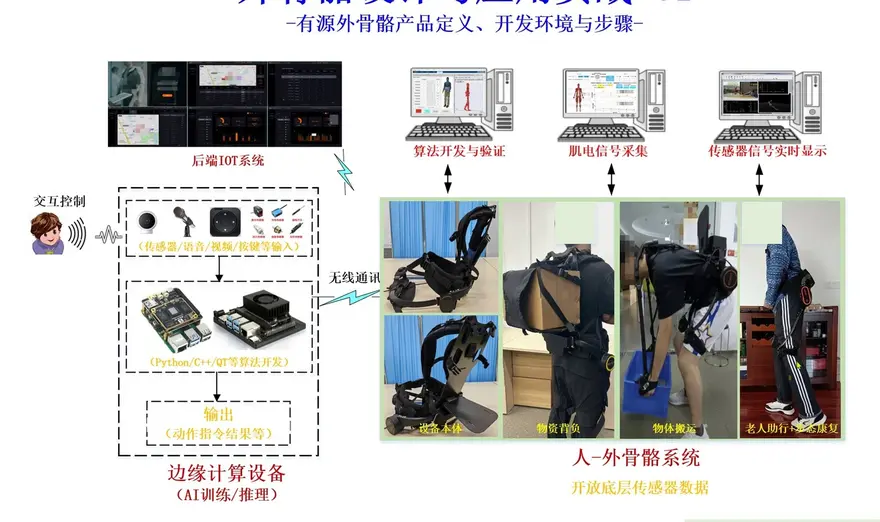
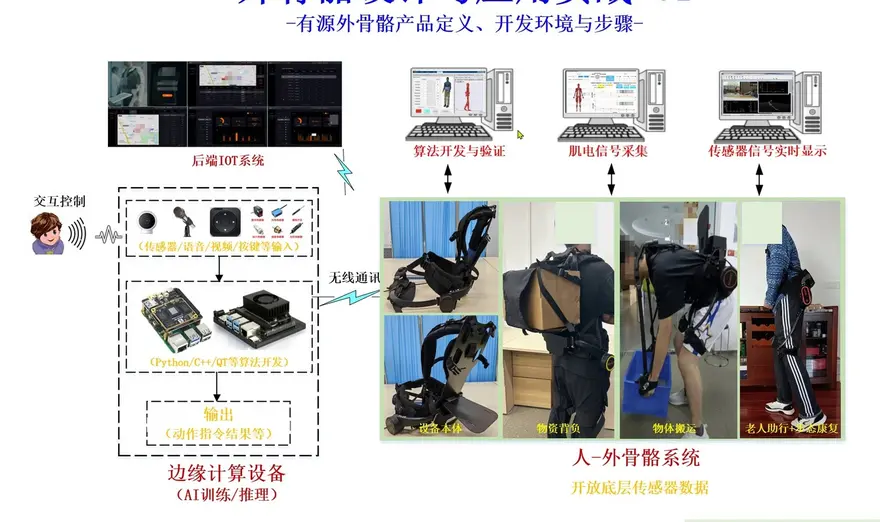
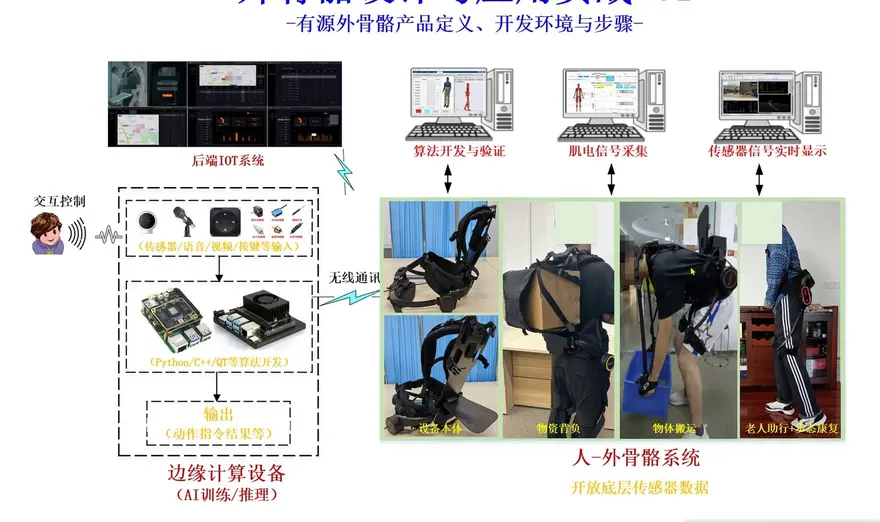
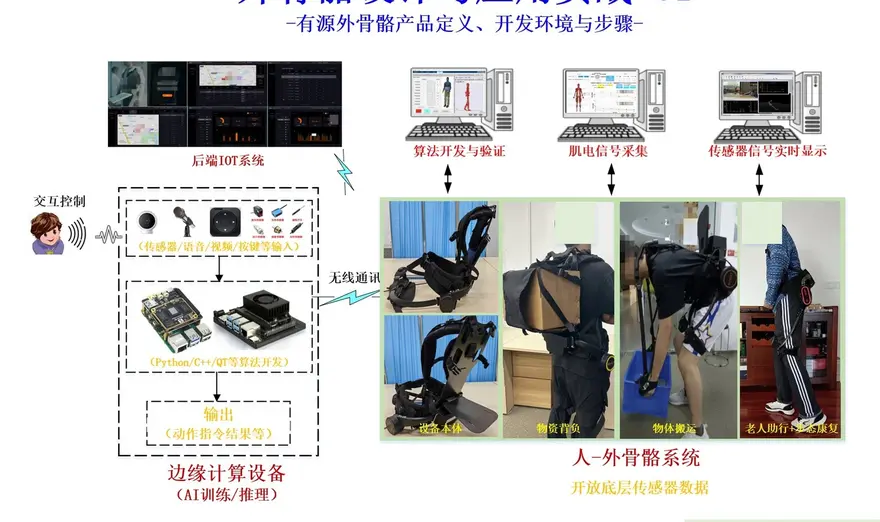
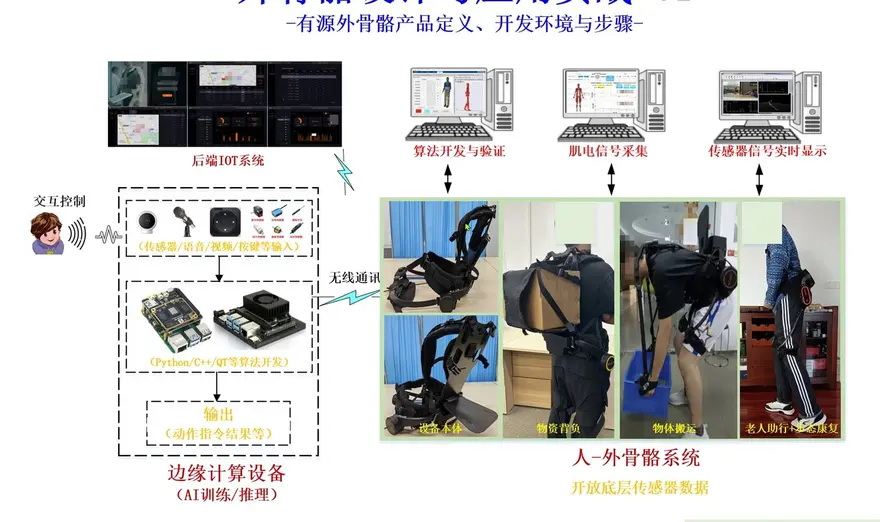
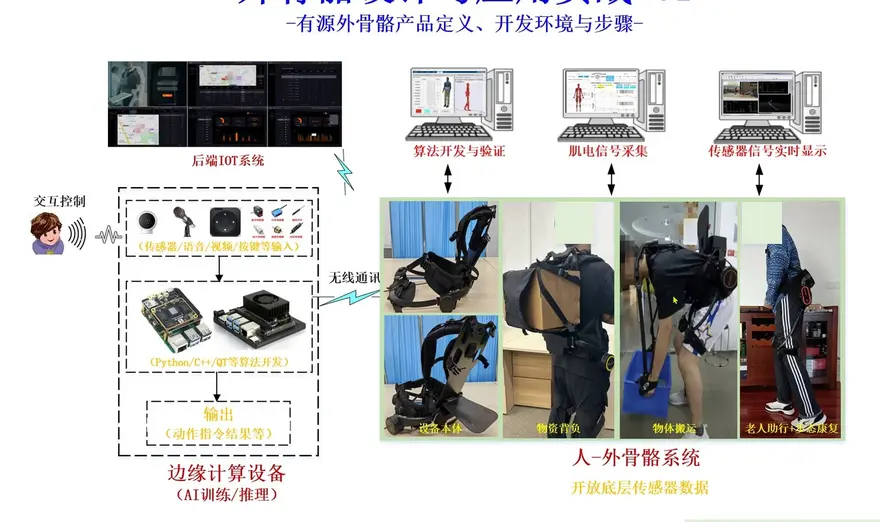
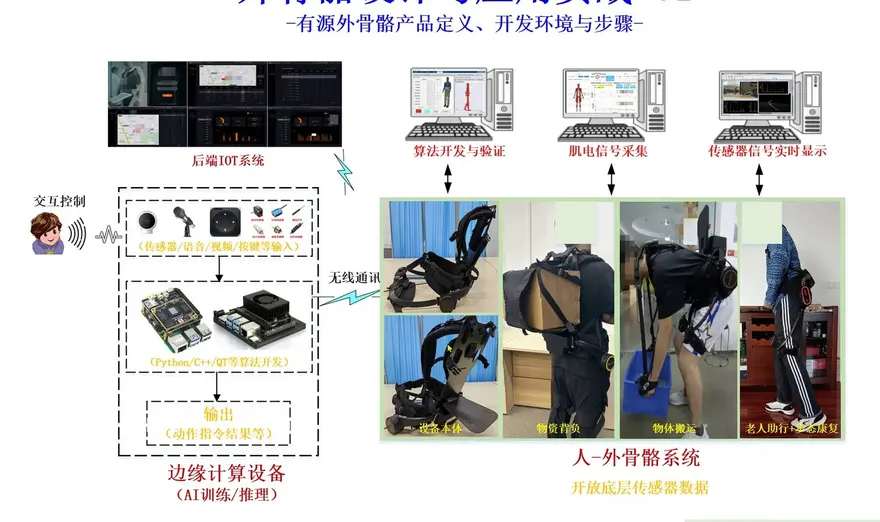
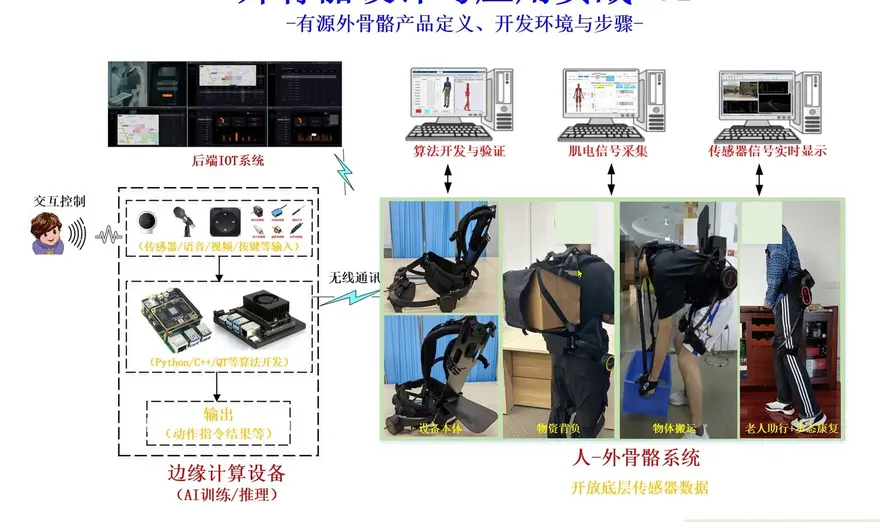
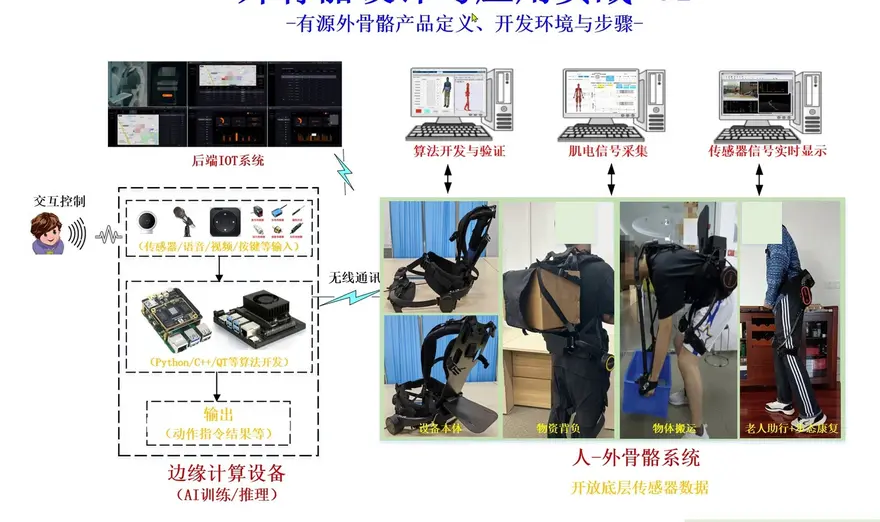
The course uses a system architecture diagram to clearly explain the concept of "centering on the exoskeleton body while expanding outwards." The main body is responsible for the structure and human-machine binding, while the peripherals form the capability pool: data acquisition via sensors, actuation by motors, power management, algorithmic decision-making, and human-machine interaction.
The essence of this architecture lies in decoupling—you can build a platform first and then "hang" applications on it. Today, it can be used for load-carrying assist; tomorrow, the same frame could become a walking assist device for the elderly. The next day, by integrating EEG/EMG signals, it can switch into a research mode. This concept of "a constant frame with extensible capabilities" is precisely the key to rapid iteration for consumer-grade exoskeletons.
The video emphasizes: "Centering on the exoskeleton allows for the expansion of many peripheral technologies, including, of course, its applications."
4. Simulation First: Run It on a "Digital exoskeleton" Before Any Hardware Exists
Many teams fall into a trap by jumping straight into mold fabrication and prototyping. Seasoned engineers prioritize simulation first—validating mechanical dynamics and control logic in a virtual environment long before a physical prototype is built. The simulation toolchain mentioned in the video includes:
- Adams: An industry veteran in multi-body dynamics simulation, used for mechanical structure force analysis.
- SiMSCAP / Simulink: For building and validating algorithms and control systems.
- CoppeliaSim (cue-batlab, should be CoppeliaSim): For robotic simulation and prototype validation.
The workflow involves conducting offline simulation to validate controllers and algorithm frameworks first, followed by a rapid online or hardware-in-the-loop validation. This "offline → online → real hardware" three-stage leap maximizes efficiency and minimizes costly prototyping rework.
Video Insight: In the absence of physical hardware early on, conducting preliminary research and algorithm development in a simulated environment—and subsequently following the "offline simulation to online, and then rapid hardware environment validation" development suite workflow—is a highly efficient paradigm for exoskeleton development.
For university researchers, there is an additional massive bonus: simulation environments allow for real-time data viewing and storage from the foundational level. Developing algorithms and controllers in a detached (simulated) environment is low-cost, highly reproducible, and makes for easy debugging. This entire toolchain will be covered in detail in the upcoming courses.
V. From Simulation to Real Machine: Bridging Electromechanics, Signals, and the Brain
Running a successful simulation is just the first step; the electromechanical system of the physical exoskeleton is the true test. Here are a few "hard bones" to crack:
1. Matching joint torque with the motor. To ensure the exoskeleton can "push effectively and stabilize reliably," we must accurately calculate the joint torque requirements under a max payload. From there, we reverse-engineer the selection of the servo motor. This is a "true physics equation"—if you miss even a minor detail, the entire system won't move or will shake uncontrollably like Parkinson's.
2. Sensor network. To perceive the human operator's movements, a consumer-grade exoskeleton relies on a perception network composed of IMUs (Inertial Measurement Units) and pressure sensors. They read the user's gait intent, which the controller then uses to determine "when to assist and by how much."
The video specifically mentions that this system can integrate electromechanical signals (EMG/EEG), or even brain-computer interface signals, to execute motion control or assistive assessment. In university research, electromechanical signals are used extensively—and relate closely to the highly popularized brain-computer interfaces.
3. Self-balancing and fall protection. As anyone who has worn an exoskeleton knows, the biggest fear is "being tripped and pulled down by the machine." Therefore, the system must have built-in self-balancing logic and a fall protection mechanism—the critical line separating a "laboratory toy" from a true "wearable device" in the consumer market.
VI. Smart Expansions: Reinforcement Learning, AI Voice, and "Button-Free Interaction"
If mechatronics acts as the skeleton and muscles, then the next step is to equip it with a "cerebellum" and a "mouth." The latter half of the video discusses two futuristic expansion capabilities:
Reinforcement learning. The academic field has already introduced reinforcement learning into exoskeleton control. This allows the machine to "learn" the most comfortable assist curves through interaction with the human body, rather than rigidly outputting power based on fixed gains.
AI Voice Control / Voice Recognition. This approach is particularly practical: many seniors lack sufficient hand muscle strength to press physical buttons or grip remote controls. If voice recognition replaces physical interaction, a senior simply says "up," and the machine activates the assist—this is highly significant for age-friendly design.
The video highlights the conflict in interaction design for children and the elderly: physical buttons are unfriendly to those with muscle weakness, making voice interaction a superior alternative; however, recognition accuracy, noise resistance in outdoor environments, and pronunciation identification are challenges that must be faced when integrating voice into products.
Of course, technical solutions beyond voice (gestures, EEG, foot pressure triggers) are also under consideration and will be discussed separately later.
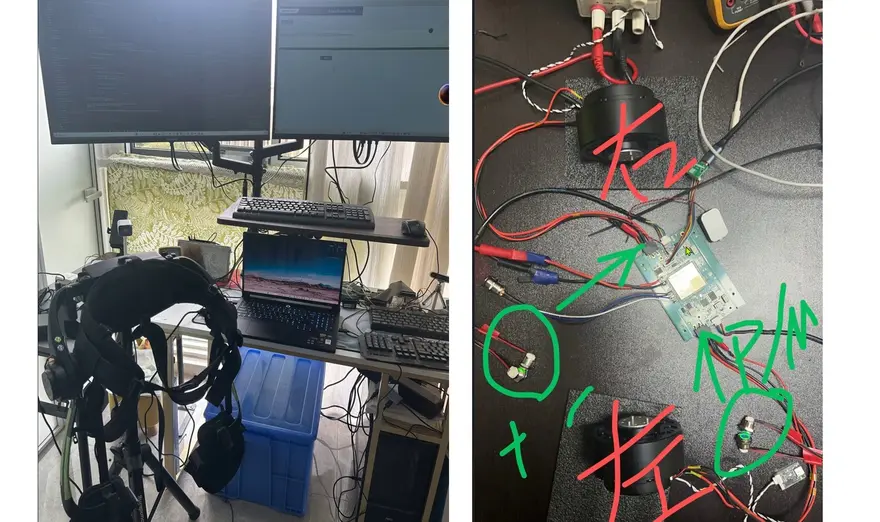
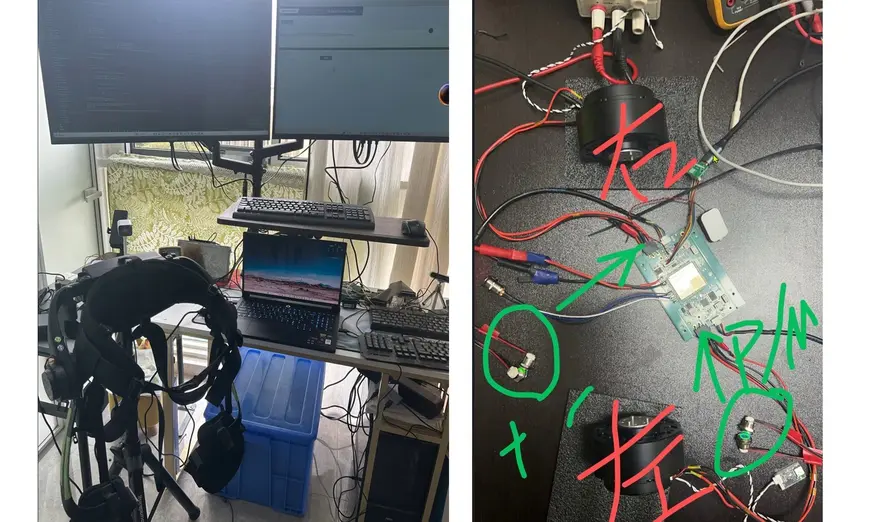
Section 7. Hardware Real-World Testing: Power-On Self-Check, Assist Activation, and Mode Switching
Here comes the most practical part—the latter half of the video directly demonstrates the real-device operation. Let's walk through the hardware interaction flow of this exoskeleton:
Power Supply and Boot-Up. The system is powered by a removable lithium-ion battery. Rotating the self-locking switch to power on triggers a voice boot-up broadcast, indicating that the device is powered and the assist function is about to activate—you can see a button flashing on the left side.
Assist Power-On. A critical design feature: the assist function will only activate when the dedicated "Assist Power-On Key" is pressed; pressing other keys will not start it. This "physical isolation" design serves as a hard constraint to prevent accidental triggers and protect the user.
Mode Switching. It enters the Flat-Ground Walking Assist Mode by default. Pressing the Sub-Mode Toggle Key on the same side switches it to Stair-Climbing Assist Mode—corresponding to two typical scenarios: walking on flat ground vs. going up and down stairs.
Assist Level. Within different assist modes, the assist level can be adjusted to correspond to different output forces.
Original Audio from the Video: "The default is the flat-ground walking assist mode; pressing the sub-mode toggle key on the same side switches to the stair-climbing assist mode; the assist level can be adjusted within the modes."
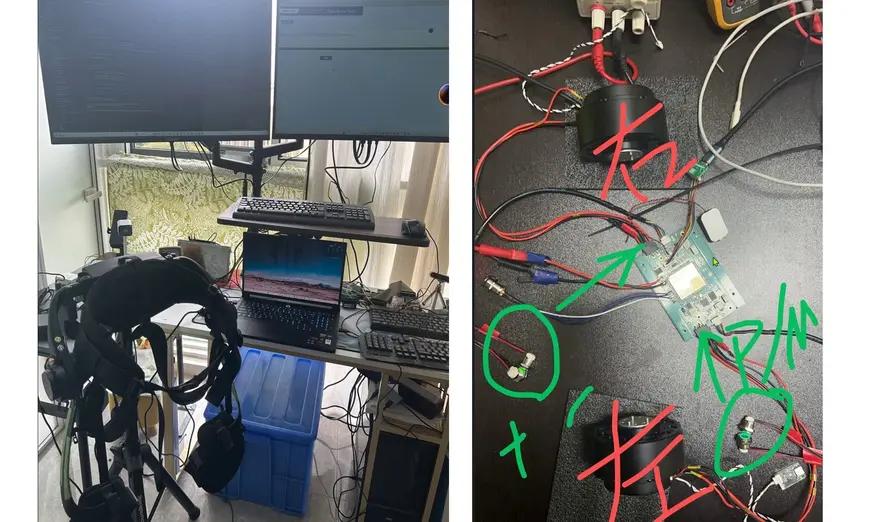
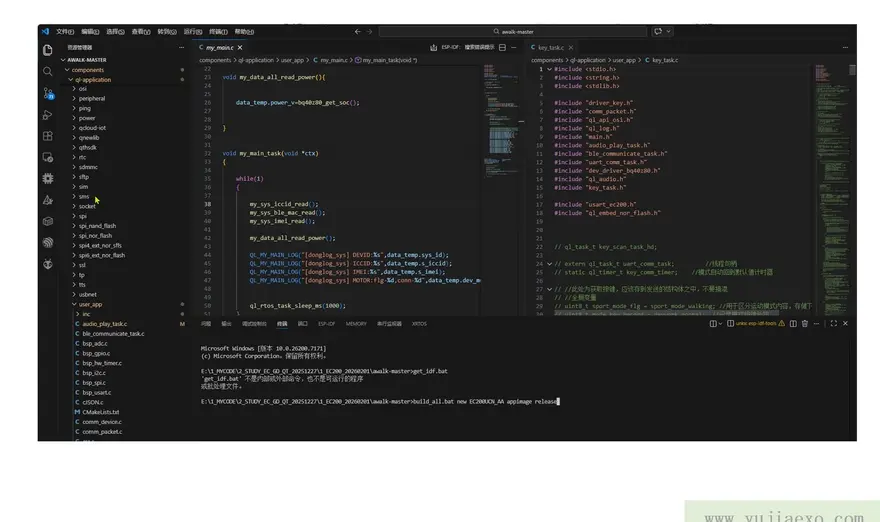
It is worth noting that throughout the demonstration, the hardware environment, complete unit assembly, electronic hardware, and the subsequent algorithms were developed in parallel—the structural design, electronic hardware, and algorithms all progressed simultaneously. This is the realistic pace required to ensure the project does not face delays.
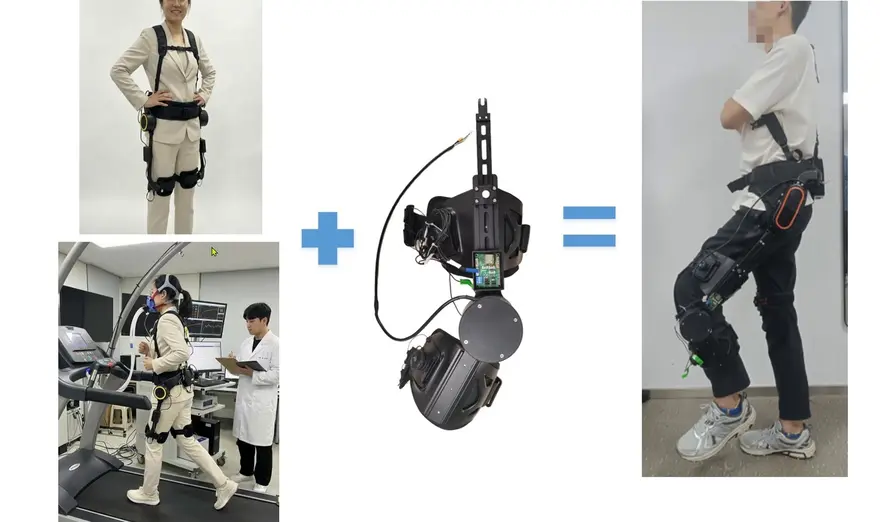
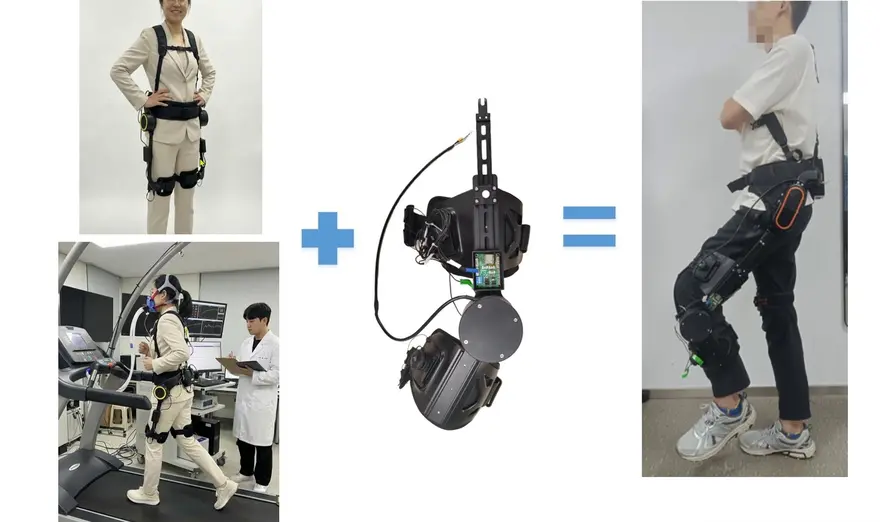
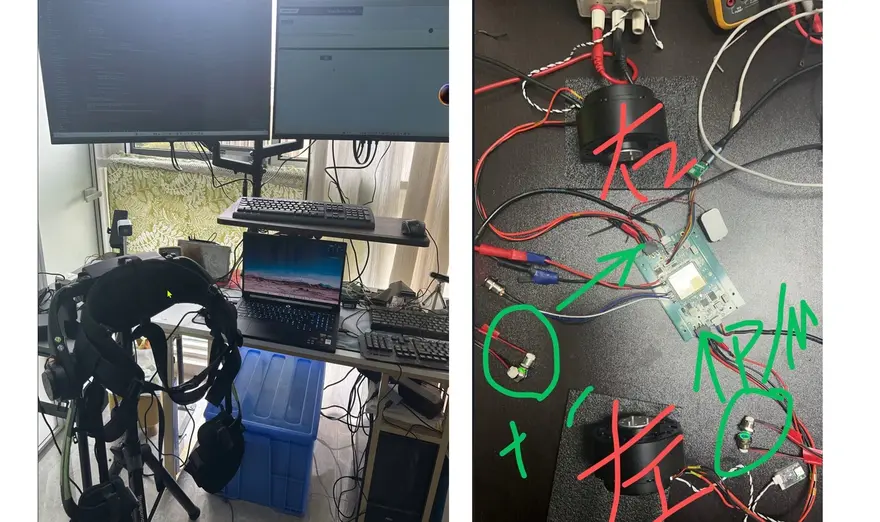
8. Structure and Battery: Engineering Trade-offs of a consumer-grade exoskeleton
The live demo brings up two engineering trade-offs that are unavoidable for a consumer-grade exoskeleton. Although the video didn't delve into the parameters, it's worth highlighting them:
The weight vs. battery life game. If you pile on servo motors and batteries to chase greater assistance, the overall weight increases, and you'll run out of power after just a few steps—at that point, it’s no longer an assistive exoskeleton, but a "torture device for carrying weight." Therefore, the real skill of a consumer-grade product lies in "using the minimum joint torque to solve the biggest problems." Lightweight materials (like carbon fiber) are standard, but balancing battery life / runtime with endurance (in hours) is the critical point.
The powered vs. unpowered route debate. There is also a school in the industry making passive lower-limb exoskeletons (with springs/elastic structures) that save effort through mechanical structures with zero energy consumption. However, for scenarios requiring "active force generation," such as climbing stairs or standing up, a passive structure cannot provide that joint torque. This hip assist platform uses a powered servo solution. It sacrifices weight and endurance in exchange for the active assistance capability to "step up when needed"—this is the most core trade-off in product definition.
This brings up the meaning of "real-world combat" in the video title: it's not just about discussing structures on paper, but wearing the real machine to take a couple of steps and climb a stair, feeling the "push-on-the-back" sensation from the motor when the joint torque is insufficient.
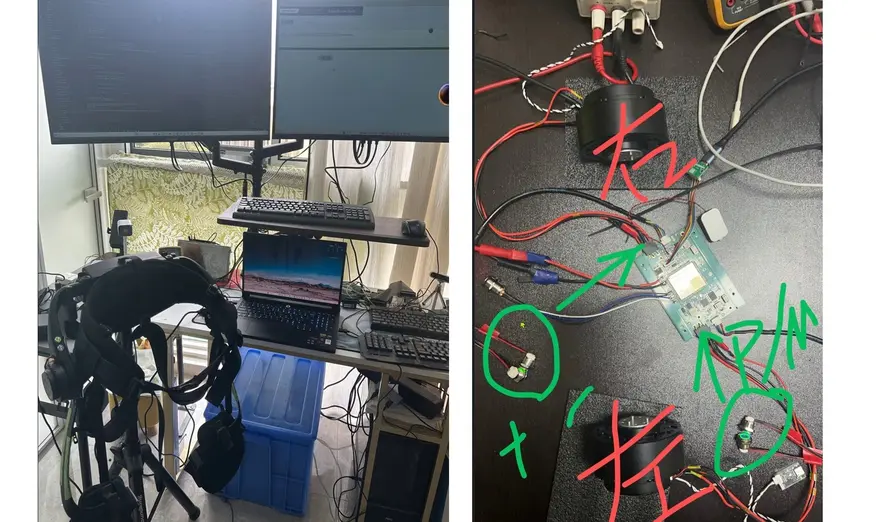
9. Target Use Cases, Learning Curve, and Competitor Comparison
Looking at the product within the competitive landscape provides a clearer perspective. The platform showcased in the video is notably focused on scientific research and educational purposes. Rather than being a finished product designed for mass consumers, it serves as an open development platform tailored for universities, research institutes, and Makers looking to teach algorithms and conduct secondary development.
The consumer-grade exoskeleton track has been incredibly vibrant in recent years. Domestic players like Aoshuang, Yuanye, Kenqing, Cheng Tian, Hypershell, and Dnsys are making significant strides, while a batch of products overseas focuses on hiking assist. Compared to these finished products directly targeting consumers, the offering in this course resembles a "LEGO baseplate". With the structural configuration, motor, sensor, battery, and algorithm interfaces all openly accessible, you get to decide what to build with it.
Target Audience:
- Academics/researchers from universities and research institutes working on gait algorithms, rehabilitation engineering, and mechatronics synergy.
- Algorithm/hardware engineers looking to enter the exoskeleton industry who lack a holistic working model.
- Makers fascinated by robotics who want to dive into open-source hardware projects.
Learning Curve: Real-world mechatronics knowledge is required (motor selection, joint torque calculation) combined with control algorithms (Simulink/reinforcement learning). It is not something you can replicate just by watching a video once, but equipped with the framework from this course, you will at least know what steps to take and whom to ask.

Top Community Comments
@Reader: Hi, what is the password? I'd like to learn from this.
—This comment directly hits the pain point of an "incomplete open source" approach. While paid knowledge and password-protected downloads are not inherently problematic, when an open source exoskeleton course that advertises practical training is blocked by a password wall at the entrance, half of the "open sharing and instant usability" flavor is lost.
@snorazera: I'm requesting the password for your official website's download center.
—This follow-up inquiry echoes the previous one, indicating that the actual threshold of the download center may be the bottleneck for learning enthusiasm. It might be better to simply paste the download links involving product definition, sensor calibration, and motor selection in the video description or pinned comments.
@Reader: Taking over the comments section.
—Behind the joke of "taking over," there is a very real expectation. The audience is eager to know what scenarios those "hip assist" exoskeletons are actually suitable for, and what max payload the joint torque can really push. More touching than the parameter table is the actual physical back-push feedback felt during the demonstration.
@Reader (Sample Comment): Does this platform support secondary development?
—These comments seem to be asking about code and interfaces, but they are actually asking about the openness of a scientific research platform. Whether they can access underlying data and whether they can connect external BCI modules - these are the "details" that anxious academic researchers care about the most.
@Reader (Sample Comment): I hope there will be a pinned video explaining control algorithms for reinforcement learning.
—The consistent feedback to post updates confirms the pain points of the "simulation - real machine - algorithm" learning path. Creating a progressive curriculum that organizes reinforcement learning training processes and data acquisition meets the advanced learning demands of the community.
@Reader (Sample Comment): When will the actual test data for battery life and overall weight be released?
—Those who look for details regarding real machines will definitely keep asking about battery life and weight. Even a rough magnitude is more convincing than the vague statement of being "suitable for trekking."
@Reader (Sample Comment): How can I download the accompanying simulation model files?
—When the focus of the audience's questions shifts from "how is the product" to "where are the development resources," it indirectly proves the guiding persuasiveness of the video IP itself. Establishing a high-quality developer resource homepage might be the true key to answering the above questions.
@the platform (Sample Comment): Request for the uploader to share the complete Adams model files~
—Following this comment, it would be good to add a note about wanting to directly place a Baidu Netdisk link or GitHub address on the homepage. This small line of backup instructions is more direct than repeatedly emphasizing the spirit of open source.
One-Sentence Summary
This session is a “super practical masterclass” that goes beyond the pilot line of exoskeleton hardware, born for grad-school researchers across the hall who crunch gait data, coder-engineers gearing up to enter the exoskeleton race, and ultimate Makers who mop up lab bills every month with main and side gigs. With real-world case studies from research-grade exoskeletons, it proves: nail the engineering economics first, then chase your consumer-grade exoskeleton dream—and the pieces will fall into place that much more naturally.
About this article: part of Chinese-Made Exoskeleton Review Archive — an independent, regularly updated English archive of reviews of consumer exoskeletons made in China, edited from publicly available video transcripts. Not an official manufacturer page.
For inquiries and purchasing, contact lonlonago@foxmail.com. More in Exoskeleton · All articles.